
Medicare cost reports are submitted by sending ECR files to your Medicare approved contractor (a.k.a MAC or intermediary). “ECR” stands for Electronic Cost Report. When a preparer finishes preparing a cost report for a healthcare facility, such as a home health agency, skilled nursing facility, hospice, RHC, FQHC, or hospital, or for a home office, he or she will need to create an ECR file for submission.
All CMS-approved software has an option for creating an electronic file. When the user creates the ECR file, he or she must then either upload the file via the MCReF portal or physically mail the file, along with the corresponding “PI” file, on a flash drive to the facility’s Medicare approved contractor (a.k.a MAC or intermediary).
The PI file is the “Picture Image” file – a picture of the cost report for the auditor to be able to view on his or her computer.
Aside from the crucial ECR and PI files, it is extremely important for the user to also mail the original, signed signature page (worksheet S of most cost reports) which is created at the time the ECR is created. What’s that?
The ECR file has a bunch of “gibberish code” at the bottom. This “gibberish” is an encryption which is unique to each individual cost report. The same code is printed on your signature page.
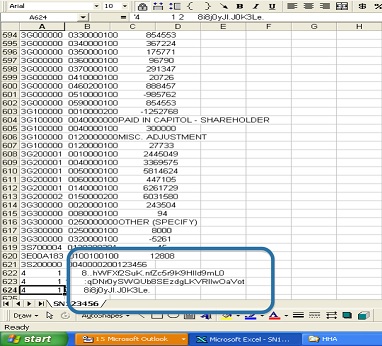
This means that if you end up changing your cost report, you will need to re-create the ECR and PI files, because they will no longer reflect the information in your cost report. When you do this, a new signature page will be created. This is the one you need to print and sign or sign on your computer.
Facilities which are filing a low utilization cost report do not create ECR and PI files and sign a blank signature page without encryption codes. (Low utilization cost report eligibility depends on the amount of Medicare reimbursement for the cost report year. Thresholds vary both by facility type and by MAC.)
Even if your MAC allows you to email or electronically submit your ECR and PI files, you will still need to upload or mail the original, signed signature page with the funny-looking code on it. Otherwise your cost report will be rejected.
If you ever open the ECR file to check that the code matches your signature page, make sure to close it without saving changes, so that you can be sure that you have not corrupted the file in any way.
If you are afraid to open the ECR file for fear of changing something, thereby corrupting the file, how can you make sure that your signature page matches the encryption in the file? A good hint is to look on the signature page for the time of ECR creation (found at the top of the ECR code section). If you look at the details of the ECR file, the file creation time should match the ECR code on the signature page.
If you have any doubts, recreate the ECR and PI files, print out the new signature page, and send the new ECR and PI files together with the new signed signature page to your MAC.
Updated 2/11/2026
Need help preparing your cost report? At PPS we have over thirty years of cost reporting experience and are happy to share our expertise with you! Contact us now for cost reporting assistance.
For information or assistance, we are, as always, here to help! Contact Us via email, website, or call 800-447-2540/ 248-968-4100 for our renowned customer service.
Disclaimer: This blog does not contain legal advice. What it does contain are our best
explanations, advice, and suggestions to help facilities and cost report preparers to understand the cost report forms and reporting process and offer suggestions for their preparation. Progressive Provider Services assumes no legal responsibility for the content of this blog, nor for cost reports or other reports prepared based on the content herein.
 Cost Report Blog
[…] means that your cost report electronic files, signature page, and supporting documentation must be mailed to your intermediary before or on the due […]
[…] **** Reminder: The cost report forms which you download are for illustrative purposes only. You may not use these PDF forms to file any cost report which requires an ECR. ECRs are Electronic Files, which must be created from CMS-approved software, such as Med-Calc software by PPS. **** (For more information, see our blog on electronic files.) […]
[…] CMS has given their approval for us to produce the mandatory PI (“Picture Image”) files as PDFs. (For more information on PI files, see our blog on ECR and PI files.) […]
[…] For more information on ECR files, see our blog on Electronic Filing of cost reports. […]
[…] must submit their cost reports electronically through Electronic Cost Reports (ECRs). These submissions must include the ECR files, the signed signature page, and any supporting […]