
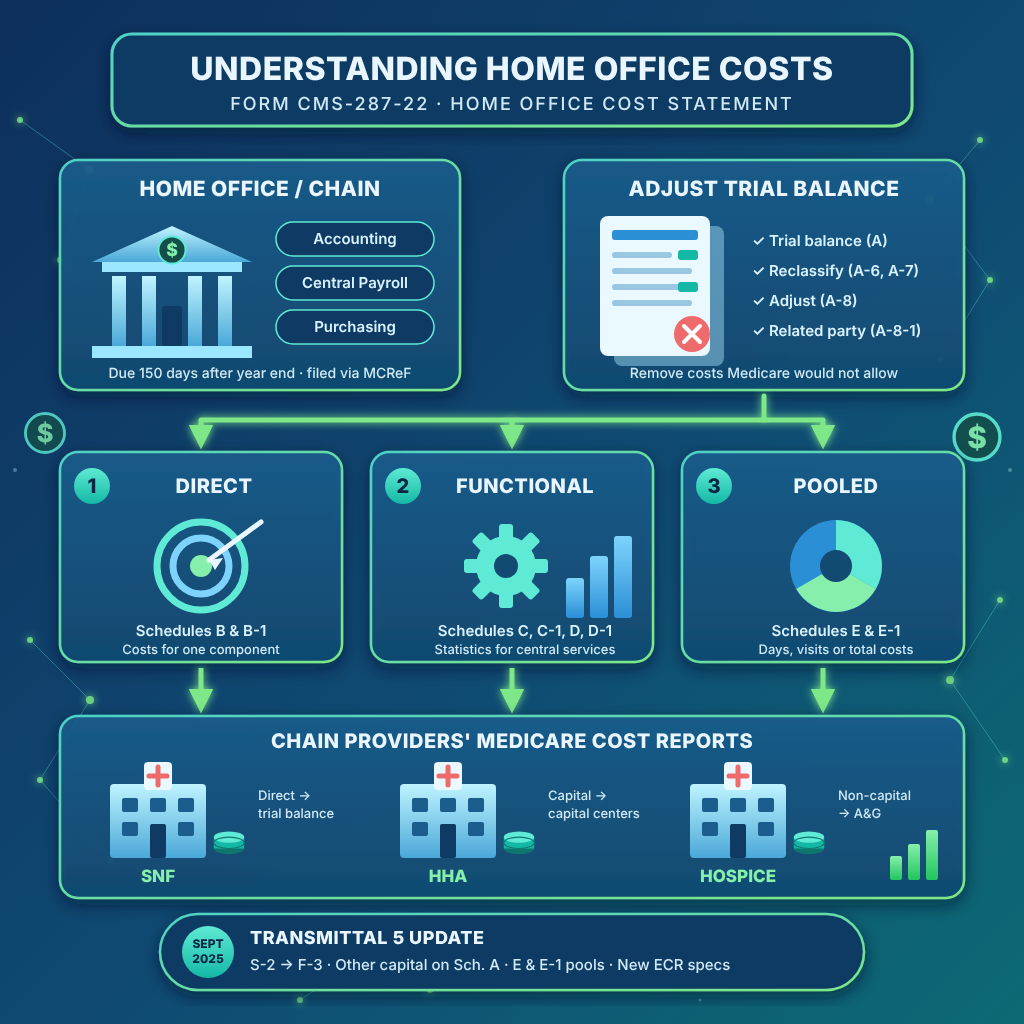
When a facility is part of a chain, some of its costs are incurred at the home office: central accounting, payroll, purchasing, management. Medicare reimburses those costs only if the home office backs them up with a home office cost statement, Form CMS-287-22. If the statement is missing, the MAC has the right to reject the provider’s cost report. As CMS steps up its efforts against waste, fraud, and abuse, correctly reporting home office and other related party costs is more important than ever.
We covered the switch to the new form in How Much More Work is the New Home Office Cost Statement?. This post covers who files, what goes in, how costs reach the providers, and what CMS changed in its September 2025 update.
Who Has to File?
CMS defines a chain organization as two or more Medicare-certified providers, or at least one provider plus any other business, under common ownership or control. The home office is the entity that gives those members centralized management and administrative services. If any provider in the chain claims home office costs on its Medicare cost report, the home office must file.
- Get a home office number first. The home office must be approved through its MAC and assigned a home office number before it can submit a cost statement.
- Regional offices file too. A region or division that allocates costs to its own components needs its own regional home office number and files a separate regional cost statement. The parent submits its statement and all regional statements together as one package.
- Due 150 days after year end. The statement is filed electronically, through MCReF or on a CD or flash drive, no later than 150 days after the end of the home office’s accounting period.
- Effective dates. The CMS-287-22 replaced the older CMS-287-05 for home office periods beginning on or after October 1, 2022.
The stakes fall on the providers. If a provider claims home office costs and the home office has not filed an acceptable statement supporting them, the MAC may reject the provider’s cost report for lack of supporting documentation. When the provider’s year end doesn’t match the home office’s, the statement must support at least the portion of the costs that overlaps.
What Goes Into It?
The statement follows Medicare reasonable cost principles (CMS Pub. 15-1). Costs that wouldn’t be allowable if the provider paid them directly aren’t allowable at the home office either. Common examples are certain advertising, management fees between related parties, costs of acquiring stock of a facility, and interest on loans between the home office and its components.
The schedules are organized in series, much like the provider cost report forms:
- S series: certification (S), home office and key officer data (S-1), and the listing of every component (S-2): healthcare providers in Part I, non-healthcare components in Part II, and regions/divisions in Part III.
- A series: the home office trial balance (A), reclassifications (A-6), capital cost analysis (A-7), adjustments (A-8), and related organization costs (A-8-1).
- B series: costs directly allocated to components, capital (B) and non-capital (B-1).
- C and D series: functional allocations, with statistics on C-1 and D-1 and the calculated allocations on C and D.
- E series: allocation of pooled costs, first among component groups (E), then to each component (E-1).
- F series: summaries of capital (F), non-capital (F-1), interest income (F-2), and total direct, functional, and pooled costs by component (F-3).
- G series: balance sheet (G) and statement of revenues and expenses (G-1).
The home office must also say on S-1 whether a CPA prepared its financial statements, and submit them with the cost statement or give the date they’ll be available.
How Costs Are Allocated to the Chain’s Providers
After unallowable costs are removed, the remaining costs are split into capital and non-capital, and each group is allocated in three steps, in this order:
- Direct allocation (Schedules B and B-1). Costs incurred for one specific component go straight to it. Examples: interest on a loan taken for one facility, salaries of home office staff who work at that location, or rent for that provider’s space.
- Functional allocation (Schedules C, C-1, D, and D-1). Centralized services are allocated on a statistic that reasonably relates to the cost, such as paychecks issued for central payroll or requisitions handled for central purchasing. The same basis must be used year after year; changing it requires a written request to the MAC.
- Pooled allocation (Schedules E and E-1). What’s left, mostly general management and administration, is the pool. Comparable inpatient providers (all SNFs) share it on inpatient days, comparable outpatient providers (all HHAs) on visits, and a mixed chain on total costs. When the chain also has non-healthcare components or regions, the double allocation method first splits the pool among the component groups on total costs, then within each group.
For example, a chain owns two SNFs and an HHA, with total costs of $6,000,000, $4,000,000, and $2,000,000. The provider types aren’t comparable, so its $300,000 pool is allocated on total costs: $150,000, $100,000, and $50,000.
On the provider’s own cost report:
- Direct costs go into the trial balance in the accounts where they belong.
- Functional and pooled capital costs go to the capital cost centers (buildings and fixtures, movable equipment). Lease costs go with depreciation.
- Functional and pooled non-capital costs go to Administrative & General as one line labeled something like “home office costs.”
- Non-concurrent year ends. Report the actual allocation for the months that overlap the home office year, and project the rest at a rate no higher than the prior statement’s. The MAC later adjusts the projection to actual.
What Changed in September 2025?
On September 26, 2025, CMS issued Transmittal 5 to Chapter 48 of the Provider Reimbursement Manual, Part 2. It clarifies instructions rather than adding new schedules, and it applies to cost statement periods ending on or after August 31, 2025. The changes:
- Schedule S-2 feeds Schedule F-3. Component names, CCNs, and regional home office numbers entered on S-2, Parts I through III, now also transfer to Schedule F-3, the summary of direct, functional, and pooled costs by component that CMS added in its January 2025 update. Each component sits on the same line on every schedule.
- Other capital costs on Schedule A. Insurance, taxes, and other capital costs that can be identified with buildings and fixtures or movable equipment go on lines 1 and 2. Only those that can’t be identified go on lines 4 through 6, to be spread on A-7.
- Pooled amounts on Schedules E and E-1. The transfer from Schedule A, column 8 is spelled out line by line, and every line now includes its subscripts: line 1 to column 3, line 2 to column 4, line 8 to column 5, line 9 to column 6, lines 10 through 27 and 29 through 98 to column 7, and line 28 (interest income) to column 8. E-1, Part III, line 52 must tie back to Schedule A, column 8 for each column.
- New electronic specifications. The ECR specification date is now 08/31/2025, and the column heading transfer table was updated. The Level 1 edit pages were reissued with wording corrections only; no edits were added. Use software approved for the new specifications for periods ending on or after August 31, 2025.
What This Means in Practice
The software handles the transfers, but it can’t decide where a cost belongs. Before entering Schedule A:
- Classify capital costs at the source. Depreciation, lease, insurance, taxes, and other capital costs tied to the home office building go on line 1. Those tied to movable equipment go on line 2. Use lines 4 through 6 only for amounts you can’t tie to either.
- Report interest correctly. Enter all interest expense on line 27, then reclassify the capital-related portion to lines 1 and 2 on Schedule A-6.
- Keep component assets out. Schedule A-7, Part I includes only assets of the home office itself, not assets directly assigned to components.
- Clear the Level 1 edits. They didn’t change in this update, but the MAC must reject any ECR file that fails one. For a chain, check these on Schedule S-2: each CCN must appear on the STAR Parent/Subunit Report for the fiscal year end claimed (1090S), a CCN listed twice can’t have overlapping periods (1081S), and acquisition and termination dates must fall within the home office period (1082S).
Need help preparing your home office cost statement or cost report or want CMS-approved cost report software? At PPS we have over forty years of cost reporting experience and are happy to share our expertise with you! Contact us now for cost reporting assistance or software.
For information or assistance, we are, as always, here to help! Contact Us via email, website, or call 800-447-2540/ 248-968-4100 for our renowned customer service.
Disclaimer: This blog does not contain legal advice. What it does contain are our best explanations, advice, and suggestions to help facilities and cost report preparers to understand the cost report forms and reporting process and offer suggestions for their preparation. Progressive Provider Services assumes no legal responsibility for the content of this blog, nor for cost reports or other reports prepared based on the content herein.

